Dooya Advanced Motor Programming
Use this guide for advanced motor programming like changing the speed on a motor, copying a remote, etc.
Changing the Speed on a Remote Motor
We do not guarantee our motors will run at the same speed. There is a 20% variance allowed between motors. Recently, we slowed our motors to 16 RPMs to make them quieter. A slower speed means less vibration since the vibration is what causes most of the noise.
The speed of our motors can be adjusted incrementally. The change will not be significant. If you are trying to get 2 or more shades to run closer together, you can speed up the slower shades and slow down the faster ones.
- To Increase the Speed
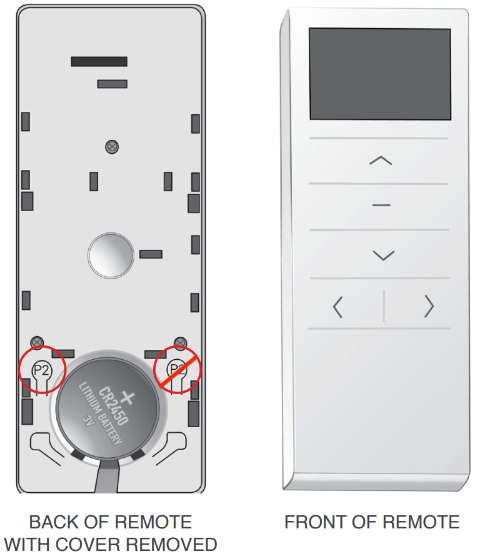
- Remove the battery cover from the back of the remote and locate the P2 button to the upper left of the battery.
- Press the P2 button and the shade will jog once and beep once.
- Press UP and the shade will jog once and beep once
- Press Up again and the shade will jog twice
- You can repeat these steps up to three times. If the shade no longer jogs or beeps when you press UP, the fastest speed has been reached.
- To Decrease the Speed
- Remove the battery cover from the back of the remote and locate the P2 button to the upper left of the battery.
- Press the P2 button and the shade will jog once and beep once.
- Press DOWN and the shade will jog once and beep once
- Press DOWN again and the shade will jog twice
You can repeat these steps up to three times. If the shade no longer jogs or beeps when you press DOWN, the slowest speed
To remove the battery cover, press in the small button on the battery cover using a tool with a tip and slide the cover down.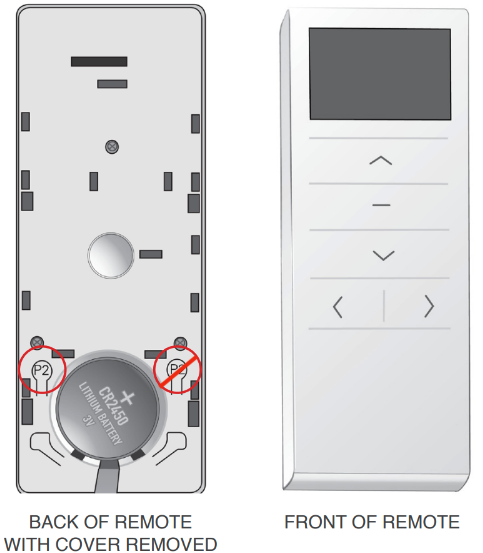
Copying a Remote
If you receive an additional remote after production, you can copy the information from your existing remote to the new remote, so you do not have to fully program the new remote.
- Make sure that the new remote is NOT paired to any motor
- Remove the back plates on both remotes
- Press the P2 button on the old remote and wait for the motor to jog, Press P2 again and wait for another jog.
- Press the P2 button on the new remote 1 time and wait for the motor to jog.
- Repeat steps 3 & 4 for each channel on the remote.
You cannot copy Channel 0. A single-channel remote will give a BLUE light if a signal is sent. A multi-channel remote will show an icon on the screen if a signal is sent.
LED Light on the Motor Head
The LED, by nature, is a very bright light. It flashes green constantly when charging and then goes solid green when fully charged. It does not turn off until the charger is unplugged. This light may be bothersome to the customer especially in a bedroom so, the LED can be turned off.
- To turn off the LED
- Move the shade to the lower limit.
- Once the shade stops moving, press and hold the DOWN button for about 5 seconds until the LED flashes red 3 times.
- To turn the LED on
- Move the shade to the lower limit.
- Once the shade stops moving, press and hold the DOWN button for about 5 seconds until the LED flashes red 3 times.
If the customer is concerned because the LED does not come on when the charger is plugged in, it may be that the LED is turned off. Turning it back on should resolve the issue.
Soft Stop
"Soft Stop" is a feature available on remote control motors that can be turned off or on. When Soft Stop is turned on, the shade movement will slow as the shade approaches its upper, lower, or middle stop limits. Shades ship with this feature automatically turned off.
How to turn it on
- Remove the back cover
- Press P2 (Shade will jog and beep), UP (Shade will jog and beep), then UP again (shade will jog only).
- Repeat the previous step until a long beep sounds after the second UP, indicating "Soft Stop" has been turned on.
How to turn it off
- Remove the back cover
- Press P2 (Shade will jog and beep), DOWN (Shade will jog and beep), then DOWN again (shade will jog only).
- Repeat the previous step until a long beep sounds after the second DOWN, indicating "Soft Stop" has been turned off.
Was this article helpful?
That’s Great!
Thank you for your feedback
Sorry! We couldn't be helpful
Thank you for your feedback
Feedback sent
We appreciate your effort and will try to fix the article