Coulisse Motors
These motors are only used in the Portfolio Collection Roller Shades and nowhere else. Only PD customers have access to this collection (no BB).
First Things First
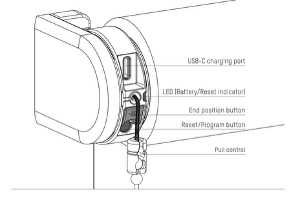
Once the shade is installed, you will need to activate the motor by connecting to a USB-C 5v power supply
Resetting the Motor
Short-press the program button on the motor and the shade will begin to jog.
Hold the program button for 20 seconds. The shade will stop jogging twice. After the second stop, the shade will give one extra jog to indicate it has been reset.
This will delete the end positions and disconnect the shade from any apps or remotes
Programming a Remote
Pairing the remote
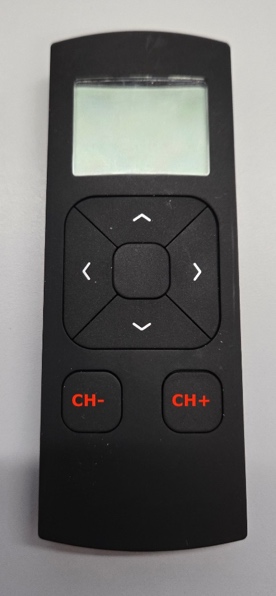
- Select the channel on the remote
- Short-press the program button on the motor to activate program mode.
- The shade will start to jog up and down constantly.
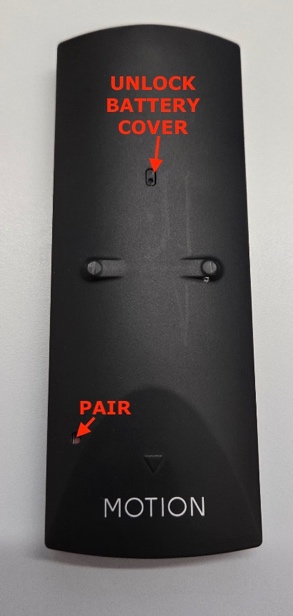
- Press the pair button on the back of the remote to pair the shade to the selected channel.
- The shade will pause jogging, indicating the remote has been paired.
Check the rotational direction
- Short-press the DOWN button to check if the shade unrolls the right way.
- The shade moves up, so the rotational direction must be changed
- Press the UP and DOWN buttons at the same time to change the direction.
Set the bottom position
- Press and hold the DOWN button until the shade reaches the desired bottom position.
- Press and hold the CENTER & UP buttons together at the same time until the shade stops jogging and starts again.
Set the top position
- Press and hold the UP button until the shade reaches the desired top position
- Press and hold the CENTER & DOWN buttons together at the same time until the shade stops jogging and starts again
Set a favorite position (optional)
- Move the shade to the desired Favorite position
- Hold the CENTER button to save the favorite
- The shade will briefly stop jogging to indicate the position is saved.
Deactivate program mode
- Short-press the program button to deactivate program mode
- The shade will stop jogging and is ready to operate.
Programming by Pull Control
The pull cord on these motors assures the end user that they can operate their shades even when the power is out, and their internet is down.
Setting end positions
- Pull the chain and hold it until the shade reaches the bottom position.
- If the shade moves in the opposite direction, release the chain and pull and hold again.
- Adjust until the desired bottom position has been reached
- When the shade is positioned at your bottom limit, hold the end position button until the shade jogs once.
- Pull and hold the chain until the shade has reached the top position.
- When the shade is positioned at the desired upper limit, hold the end position button until the shade jogs once.
Adjusting the end positions
- Pull the chain and wait until the shade reaches the position you wish to change.
- Remove the current position by holding the end position button for 3 seconds. The shade will jog once to confirm the limit is removed.
- Move the shade to the new limit you want.
- Hold the end position button until the shade jogs once to save the new limit.
Setting a favorite position (optional)
- When there is no favorite position programmed, you need to move the shade to where you want the favorite to be.
- Hold the pull cord for about 7 seconds until the shade jogs once.
Controlling the shade to the favorite position
- Hold the pull chain for 5 seconds, and the shade will move to the favorite position.
Setting a new favorite position
- Move the shade to the current favorite position.
- Hold the pull cord for about 7 seconds until the shade jogs once
- Move the shade to your new favorite position
- Hold the pull cord for about 7 seconds until the shade jogs once
Changing the direction of rotation
- If the position of the shade in the app is opposite to the shade, change the direction by pressing the end position button twice within one second.
Activate/Deactivate Motor (Transport Mode)
The motor can be deactivated so that the motor will not be triggered while transporting the shade or if you take it down for painters, etc.
- Hold the program button and pull the cord twice to either activate or deactivate the motor.
- When the motor is activated, a green LED will light up, and shortly after a red LED will light up
- When the motor is deactivated, a red LED will light up
Bluetooth Operation
I feel this is Coulisse’s preferred way to operate the shades. It is easy to set up and operate. There is no account to set up, and all data is secure because there is no cloud storage. This only Bluetooth so it has a range of 32 feet. To control the shades from outside the home, a hub is required.,
Pairing the Motor
- Download the MotionBlinds Bluetooth app (available in the Google Play Store and the Apple App Store).
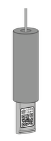
- Expose the QR code on the tassel of the pull cord.
- Scan the QR Code with the phone to add the shade to the app.
- If limits have not been set, follow onscreen instructions to do so.
Was this article helpful?
That’s Great!
Thank you for your feedback
Sorry! We couldn't be helpful
Thank you for your feedback
Feedback sent
We appreciate your effort and will try to fix the article