Wand Motor Programming
Orders Placed Before 6.3.2025
This guide will help with the basic operation and programming of the wand motors.
The Equipment
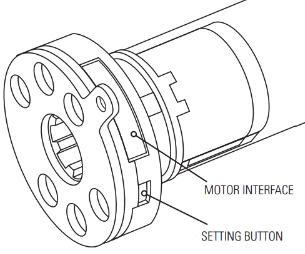
THE MOTOR
Your wand control shade is operated by a rechargeable lithium-ion battery motor. The battery is inside the motor tube and never needs to be accessed. It is recharged via a charging port at the end of the wand.
THE WAND
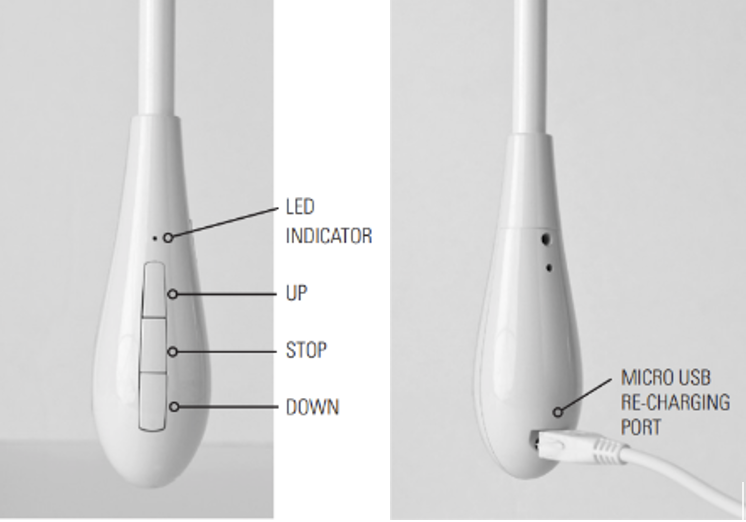
This is your controller for the shade. It is directly plugged into the motor and is used for operating, charging, and programming the motor.
Operation
Your shade has been programmed at the factory with an upper and lower stop limit. This means it will automatically stop when the shade is fully raised or lowered.
Once your shade is installed, check the operation.
The wand has three buttons: UP, STOP, and DOWN
- Press the UP button to raise the shade to the preset upper limit
- Press the STOP button to stop the shade at any desired location
- Press the DOWN button to lower the shade to the preset lower stop limit
Programming
The following instructions are for programming your wand motorized shades.
Resetting the shade motor
If needed, you can reset the motor to its factory settings. This will remove all stop limits from the motor.
Press and hold the Setting Button on the motor crown until the shade jogs 3 times
There is a longer pause between the 2nd and 3rd jogsReversing the shade direction
Once you have reset the shade, check that the motor is moving in the correct direction (i.e. Up is Up)
If you need to reverse the shade direction, press and hold the Setting button on the motor crown until the shade jogs 2 times.
Setting limits
If you have factory reset the motor, you will need to set limits. Although the motor prefers to have the upper limit set first, if you are closer to the bottom, you may set the lower limit first.
The motor will be in "program mode" and only moves in small steps. To move the shade more quickly, press and hold the UP or DOWN button until the shade continually moves. Please note that there are not stop limits programmed so you will need to stop the shade when it gets close to where you want it.SETTING THE UPPER LIMIT
Move the shade to the desired upper stop position, then press and hold the UP&STOP buttons together until the shade jogs 2 times and beeps once.
SETTING THE LOWER LIMIT
Move the shade to the desired lower stop position, then press and hold the DOWN&STOP buttons together until the shade jogs 2 times and beeps once.
SETTING A MIDDLE STOP OR FAVORITE POSITION
Once the Upper and Lower stop positions have been set, you may set a Middle Stop or Favorite Position.
Move the shade to the desired position, then press & hold the STOP button for 5 seconds until the shade jogs and beeps
Changing the limits
Although the factory presets limits on all motors, you may want to adjust these limits to suit your installation.
CHANGING THE UPPER LIMIT
Press the UP button to move the shade to the existing upper stop limit.
Press and hold the UP&STOP buttons together until the motor jogs once. This puts the shade in program mode
It may take up to 10 seconds for the shade to react.Move the shade to the desired upper stop limit
Press and hold the UP&STOP buttons together until the motor jogs two times.
CHANGING THE LOWER LIMIT
Press the DOWN button to move the shade to the existing upper stop limit.
Press and hold the DOWN&STOP buttons together until the motor jogs once. This puts the shade in program mode
It may take up to 10 seconds for the shade to react.Move the shade to the desired upper stop limit
Press and hold the DOWN&STOP buttons together until the motor jogs two times.
Maintenance
Your wand motor will need charging from time to time. The LED on the front of the wand will flash red when the motor is at about 20% charge.
Plug the charger cable into the micro-USB port on the back of the wand, and the other end into a wall outlet.
When the motor is fully charged, the LED on the front will glow a steady green. Once the motor is fully charged, unplug the charger from the wand and then from the wall.
Troubleshooting
Wand will not operate the motor
MAKE SURE THAT THE MOTOR IS CHARGING
- Use a pencil eraser to push firmly on the wand plug and ensure that it is fully seated in the motor interface
- Recharge the battery
- If you were able to recharge the battery, the wand should now operate your shade
- If after recharging the battery the shade still will not operate, check the motor. Use an opened paperclip to press the Setting button on the motor crown.
- If the shade moves, press the button again to stop the shade and contact Customer Service to replace the wand.
- If the shade does not move, the motor is defective and needs to be replaced. Contact Customer Service to obtain a new motor.
NO LED LIGHT SHOWING
If during charging there is no LED light (red or green) showing,
- Check the connection between the wand and the motor. Use a pencil eraser to push firmly on the plug and ensure that it is fully seated
- If the connection is good, but no LED light is visible, then the wand needs to be replaced. Contact Customer Service to obtain a replacement wand.
Was this article helpful?
That’s Great!
Thank you for your feedback
Sorry! We couldn't be helpful
Thank you for your feedback
Feedback sent
We appreciate your effort and will try to fix the article