How to Enter a Fedex Call Tag
Last Updated: 04.21.2026
A FedEx Call Tag is issued (return shipping label) when we need to have something picked up and returned to us or when we need to reroute misdirected orders. To create the Call Tag:
1. Visit to www.fedex.com
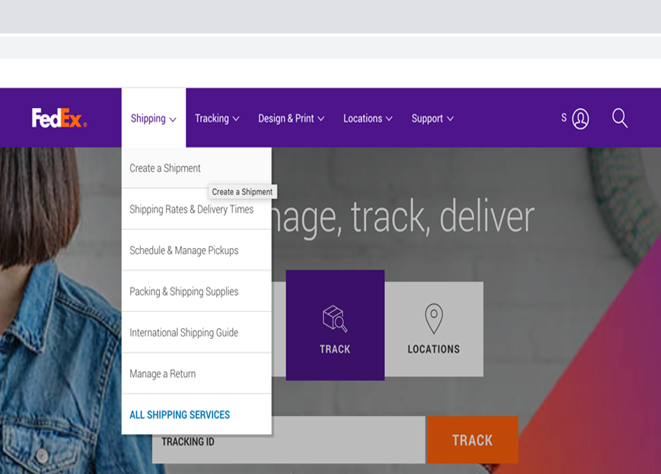
2. Click on “Shipping” then “Create a Shipment”
Login with the company credentials:
USERNAME: T445FOB
PASSWORD: Tburg8252!
3. Choose the drop-down option “Return Shipment”
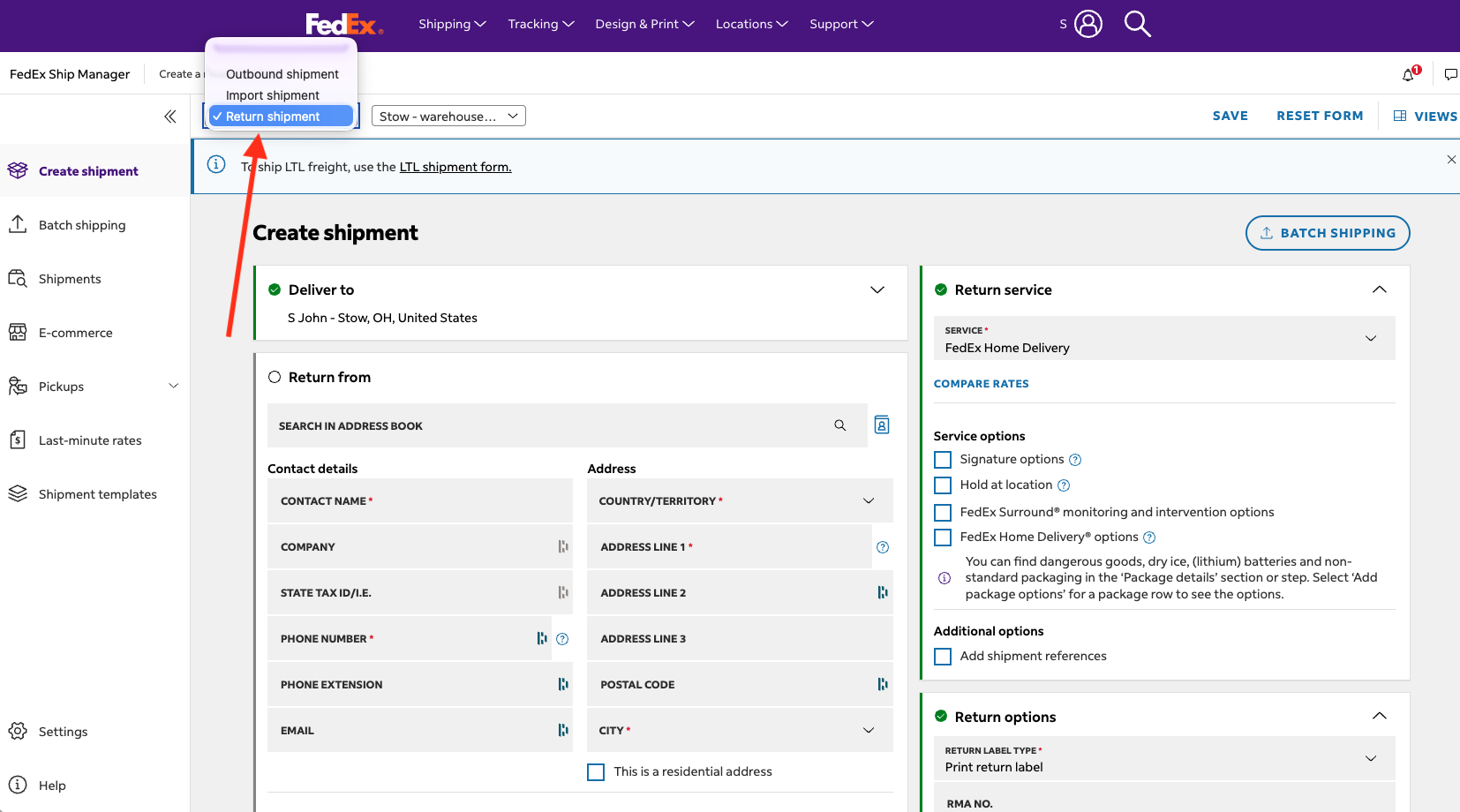
4. Complete all 6 Sections:
Deliver To:
- If the package(s) is being returned to us for review, repair, or restock, you do not need to change anything here. Go to the next step - "Return From".
- If this is a reroute of an order that was misdirected, enter the information for where to it needs to be delivered.
Return From:
- This is the pick up address. Enter the information for where the package is being picked up.
Package Details:
- Package type: Use “Your Packaging”
- Check "Purchase a higher limit of liability from Fedex if the package contents" Enter approx. value, use $50 if unsure
- No. of returns: Limit 1 package per return, if returning multiple boxes, enter a return shipment for each box.
- Weight: Enter approx. weight. Use 7 lbs. per shade if unsure.
- Dimensions: Enter approx. dimensions.
- Add Package Options: Select Lithium Ion Battery option if you know you are returning a motor, or lithium ion battery accessory. Select option: Ion Contained in Equipment (UN3481, PI967)
Return Service:
- Service type: Use ground in most cases.
- Check "Add Shipment Reference" Delete "BLZ" and enter the FD# or SO# in the Shipment Reference text box
Return Options:
- Email Return Label (Fed Ex e-mails a link to the customer to print the label, put it on the box and either take it to the nearest FedEx location or hand it to the regular FedEx Driver).
- Enter details accordingly, set the Return Label Accessible Until to 1-3 months from the todays date depending on the return type (review, repair, stock, etc.)
- Return Item Description: Enter brief description of what it is (i.e. shade to reroute, shade for review)
- NOTE: Once printed, return labels expire after 15 days, if this is the case, a new return shipment will need to be created.
- Fedex Ground Call Tag (We schedule a day for FedEx to pick up the package. Driver arrives with the label. FedEx will make three attempts to pick up the package.)
- Enter details accordingly:
- Pick up date, Ready Time of 9 AM, Close Time of 5PM.
- Return Item Description: Enter brief description of what it is (i.e. shade to reroute, shade for review)
- Pick up Instructions: Enter "long, thin box for marked for FedEx pick up"
Billing:
- Bill Transportation Costs To: Select account according to where the box is being returned to: Warehouse or Production. If the shipment is a reroute, bill to Warehouse.
Save or Finalize
5. Confirm Call Tag Details with the Customer:
1. Email the customer and let them know the tracking number.
2. If it is a pick up, let them know to have the box outside before 9am on the day of pick with a not that says “For FedEx Pick Up”. If it’s an email tag, let them know they need to watch for the email from FedEx.
3. Log the Call Tag in the CT log. This is in SP in Daily Files=>Review-Repair-Reroute-Restock (call tags). Enter a new line and complete each cell with the info as to why the CT was issued. If you need help or are unsure what to put, ask your manager.
Was this article helpful?
That’s Great!
Thank you for your feedback
Sorry! We couldn't be helpful
Thank you for your feedback
Feedback sent
We appreciate your effort and will try to fix the article