Frequently Asked "XDM DSS" Question:
QUESTION:
The customer received their shade with the motor's charging port and setting button positioned toward the front of the cassette, making them inaccessible to the customer.
EXPLANATION:
Please follow the steps below to reposition the motor:
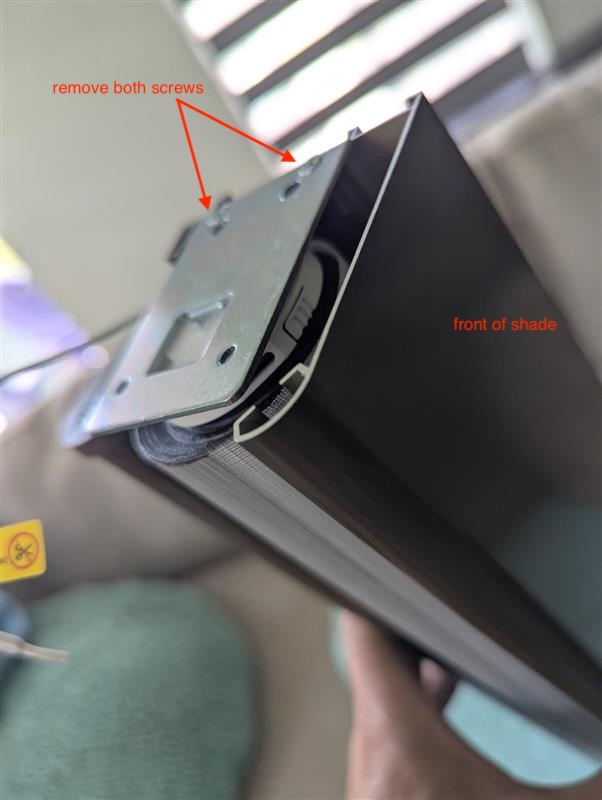
Remove the two screws located at the top of the bracket to detach the bracket from the cassette.
Gently pull the motor slightly out of the tube and rotate it to the desired position.
Reinstall the bracket, ensuring the motor remains in the new position.
Operate the shade to verify proper function. If necessary, readjust the upper and lower limits after repositioning the motor.
PROPOSED RESPONSE:
To reposition the motor within the cassette so that the charging port and setting button are accessible, please follow the steps below.
Remove the two screws located at the top of the bracket to detach the bracket from the cassette.
Gently pull the motor slightly out of the tube and rotate it to the desired position.
Reinstall the bracket, ensuring the motor remains in the new position.
Operate the shade to verify proper function. If necessary, readjust the upper and lower limits after repositioning the motor.
Was this article helpful?
That’s Great!
Thank you for your feedback
Sorry! We couldn't be helpful
Thank you for your feedback
Feedback sent
We appreciate your effort and will try to fix the article